Coupon Management
The Coupon Management module allows administrators to create, manage, and monitor promotional coupons for Ride Sharing, Delivery, and other Drivo services.
Coupons help increase user engagement, attract new customers, and provide discounts on platform services.
Coupon List
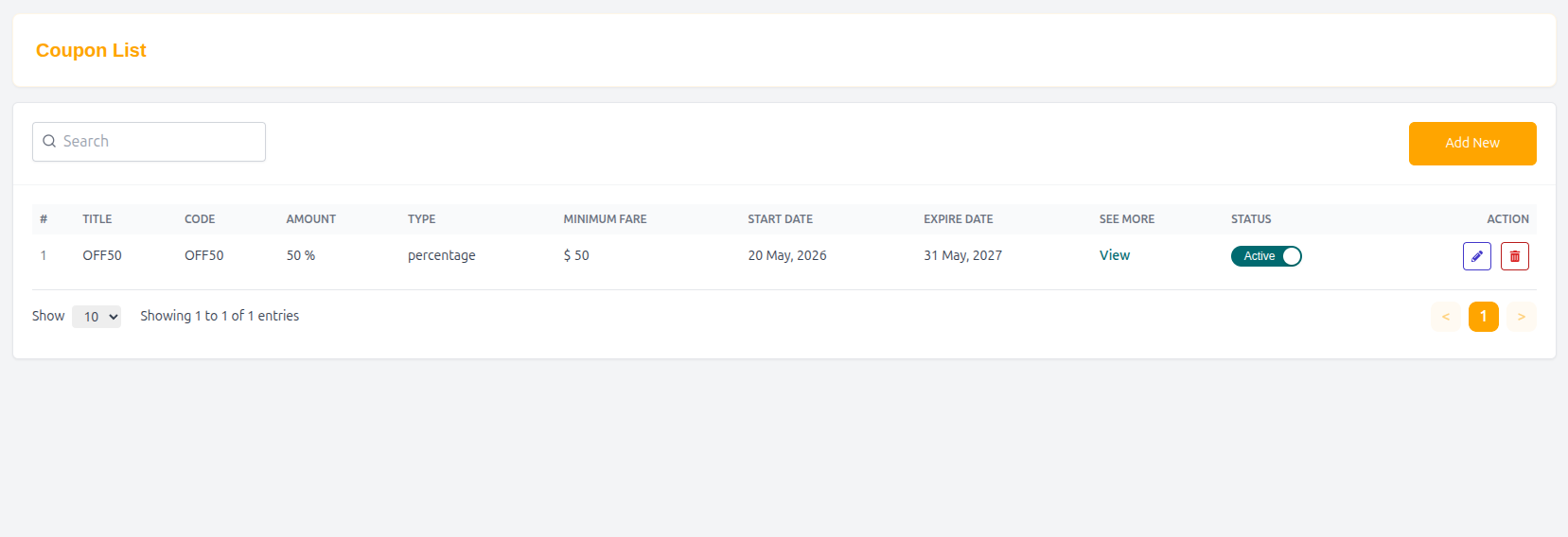
The Coupon List page displays all available coupons in a searchable and manageable table format.
Features
- Search coupons quickly
- Add new promotional coupons
- Monitor coupon validity
- Track discount information
- Manage coupon visibility and status
Table Structure
| Column | Description |
|---|---|
| # | Serial number |
| Title | Coupon title |
| Code | Unique coupon code |
| Amount | Discount amount or percentage |
| Type | Coupon discount type |
| Minimum Fare | Minimum required spending amount |
| Start Date | Coupon activation date |
| Expire Date | Coupon expiration date |
| See More | View coupon details |
| Status | Active or inactive status |
| Action | Edit or manage coupon |
Example Entry
| # | Title | Code | Amount | Type | Minimum Fare | Start Date | Expire Date | Status | Action |
|---|---|---|---|---|---|---|---|---|---|
| 1 | OFF50 | OFF50 | 50% | Percentage | $50 | 20 May, 2026 | 31 May, 2026 | Active | View |
Add Coupon
Administrators can create promotional coupons using the Add Coupon form.
Coupon Information
Title
Enter the coupon title displayed in the system.
Example
- HappyRide25
- JOYRIDE20
Code
Enter the unique coupon code users will apply during checkout.
Example
- FAST25
- TripSaver20
Type
Select the coupon discount type.
Available Types
- Percentage
- Fixed Amount
Value
Enter the coupon discount amount or percentage value.
Example
- 50
- 25%
Minimum Expend Amount
Defines the minimum required spending amount before the coupon can be applied.
Example
- $50 minimum fare required
Visibility Settings
Controls where and to whom the coupon will be visible.
Visibility Options
- Public
- Private
- Selected Users
- Drivers Only
- New Users Only
Coupon Schedule
Start Date
Defines when the coupon becomes active.
Expire Date
Defines when the coupon becomes invalid.
Description
Administrators can enter additional coupon details or promotional information.
Example
- “Get 50% off on your next ride.”
Submit Coupon
After entering all required information:
- Click Submit to create the coupon.
Why Coupon Management Matters
- Increases customer engagement
- Encourages repeat bookings
- Supports promotional campaigns
- Attracts new platform users
- Boosts ride and delivery activity
Summary
The Coupon Management system enables administrators to create flexible promotional campaigns and discount strategies, helping Drivo improve user retention, increase bookings, and grow platform engagement effectively.