Vehicle Management
The Vehicle Management module allows administrators to monitor, manage, and verify all vehicles registered on the Drivo platform. This includes vehicle information, driver association, status management, and verification processes.
Vehicle List
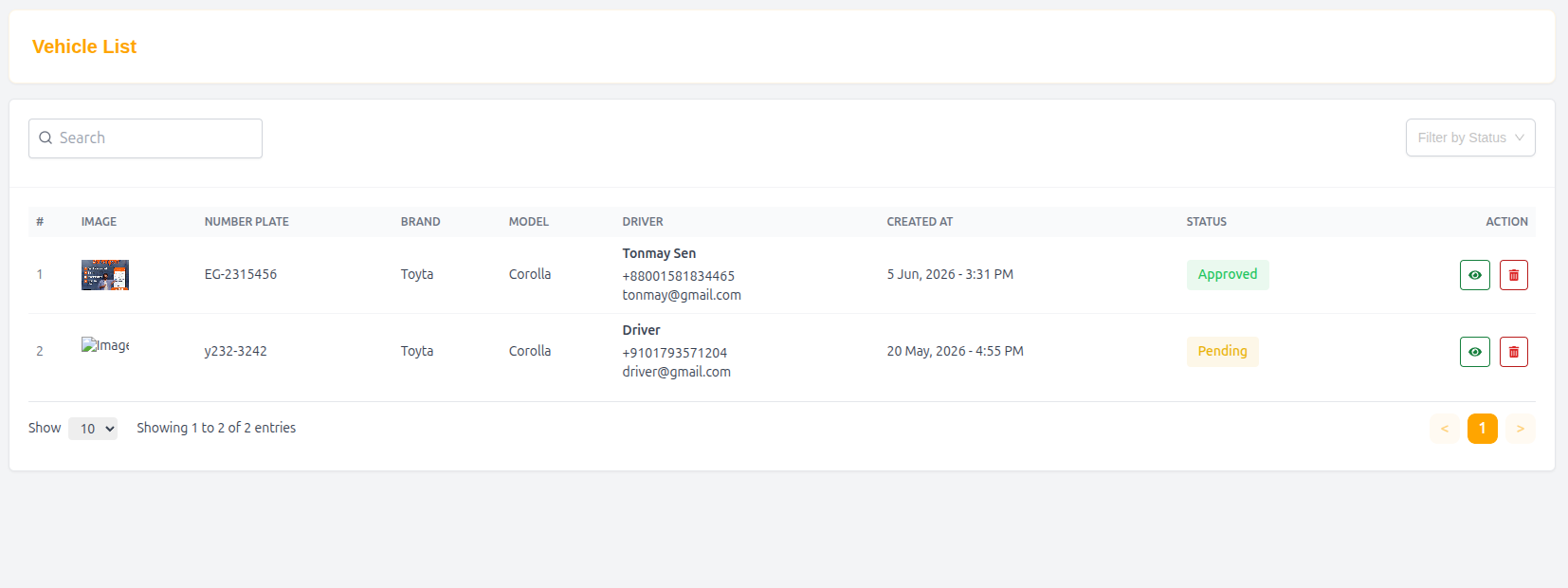
The Vehicle List page displays all registered vehicles in a structured and searchable table format.
Features
- Search vehicles quickly
- View vehicle and driver information
- Monitor vehicle approval status
- Access detailed vehicle information
- Manage vehicle verification and updates
Table Structure
| Column | Description |
|---|---|
| # | Serial number |
| Image | Vehicle image |
| Number Plate | Vehicle registration number |
| Brand | Vehicle brand |
| Model | Vehicle model |
| Driver | Assigned driver information |
| Created At | Vehicle registration date |
| Status | Vehicle approval status |
| Action | View or manage vehicle |
Example Entry
| # | Image | Number Plate | Brand | Model | Driver | Created At | Status | Action |
|---|---|---|---|---|---|---|---|---|
| 1 | 🚗 | y232-3242 | Toyta | Corolla | Driver | 20 May, 2026 - 4:55 PM | Pending | View |
Driver Information in List
Each vehicle entry contains associated driver details:
- Driver Name
- Phone Number
- Email Address
Example
- Name: Driver
- Phone: +9101793571204
- Email: driver@gmail.com
Vehicle Details
The Vehicle Details page provides complete information about a selected vehicle and its associated driver.
Vehicle Information
Fields
| Field | Description |
|---|---|
| Images | Uploaded vehicle images |
| Vehicle Type | Vehicle category |
| Brand | Vehicle brand |
| Model | Vehicle model |
| Year | Manufacturing year |
| Number Plate | Vehicle registration number |
| Seat | Number of passenger seats |
| Online Status | Driver online/offline availability |
| Added At | Vehicle registration date |
| Updated At | Last update timestamp |
| Status | Vehicle approval status |
Example Vehicle Information
| Field | Value |
|---|---|
| Vehicle Type | Car |
| Brand | Toyta |
| Model | Corolla |
| Year | 2022 |
| Number Plate | y232-3242 |
| Seat | 5 |
| Online Status | Offline |
| Added At | 20 May, 2026 - 4:55 PM |
| Updated At | 20 May, 2026 - 4:56 PM |
| Status | Pending |
Driver Information
This section displays the driver associated with the vehicle.
Fields
| Field | Description |
|---|---|
| Name | Driver full name |
| Driver email address | |
| Phone | Driver contact number |
| Gender | Driver gender information |
Example Driver Information
| Field | Value |
|---|---|
| Name | Driver |
| driver@gmail.com | |
| Phone | +9101793571204 |
| Gender | N/A |
Update Vehicle Status
Administrators can update vehicle approval and operational status.
Available Status Options
- Pending
- Approved
- Rejected
- Suspended
Why Vehicle Management Matters
- Ensures proper driver verification
- Maintains transportation safety standards
- Helps monitor active vehicles
- Improves operational transparency
- Supports efficient ride and delivery services
Summary
The Vehicle Management system provides administrators with complete control over registered vehicles, driver associations, and approval workflows, ensuring secure and reliable transportation operations throughout the Drivo platform.