Type Management
The Vehicle Type Management module allows administrators to create, manage, and configure vehicle categories used for Ride Sharing and Delivery services within the Drivo platform.
This module controls vehicle information, fare configuration, delivery pricing, ride pricing, and weight limitations.
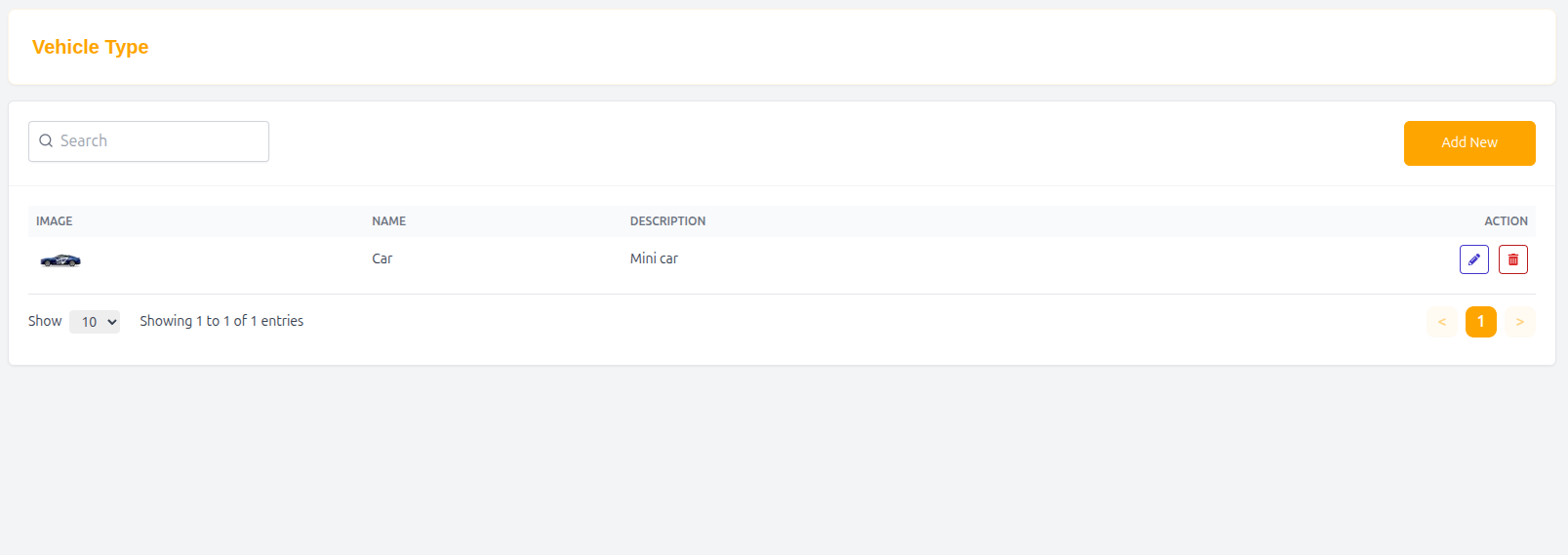
Vehicle Type List
The Vehicle Type List displays all available vehicle categories in a structured table format.
Features
- Search vehicle types
- Add new vehicle categories
- Edit existing vehicle information
- Configure fare settings
- Manage vehicle images
Table Structure
| Column | Description |
|---|---|
| Image | Vehicle type image |
| Name | Vehicle category name |
| Description | Short vehicle description |
| Action | Edit or manage vehicle type |
Example Entry
| Image | Name | Description | Action |
|---|---|---|---|
| 🚗 | Car | Mini car | Edit |
Add / Edit Vehicle Type
Administrators can create or update vehicle type information from this section.
Vehicle Information
Basic information about the vehicle category.
Fields
Name
Vehicle category name.
Example: Car
Description
Short description of the vehicle type.
Example: Mini car
Delivery Fare Configuration
This section controls pricing rules for parcel delivery services using this vehicle type.
Fields
Base Fare
Initial delivery charge applied at the start of a delivery.
- Example: 10
Minimum Fare
Minimum delivery charge regardless of distance or weight.
- Example: 5
Per Kg
Additional charge based on parcel weight.
- Example: 2 per kg
Per Km
Distance-based delivery charge.
- Example: 1 per km
Ride Fare Configuration
This section controls ride-sharing fare calculations for the selected vehicle type.
Fields
Base Fare
Initial ride booking charge.
- Example: 20
Per Km
Distance-based ride charge.
- Example: 3 per km
Minimum Fare
Minimum ride cost regardless of distance.
- Example: 3
Max Weight
Defines the maximum weight capacity supported by the vehicle type.
- Example: 100 kg
This is primarily used for delivery and bag-sharing services.
Vehicle Image
Administrators can upload a representative image for the vehicle type.
Features
- Upload vehicle image
- Update existing image
- Display image in vehicle listing
Submit Vehicle Type
After completing all required information:
- Click Submit to save the vehicle type configuration.
Why Vehicle Type Management is Important
- Enables flexible fare calculation
- Supports multiple transport categories
- Helps optimize ride and delivery pricing
- Improves service organization
- Supports scalable mobility operations
Summary
The Vehicle Type Management system gives administrators complete control over transportation categories, fare structures, and delivery configurations, ensuring efficient and flexible service management across the Drivo platform.