Transction History
Overview
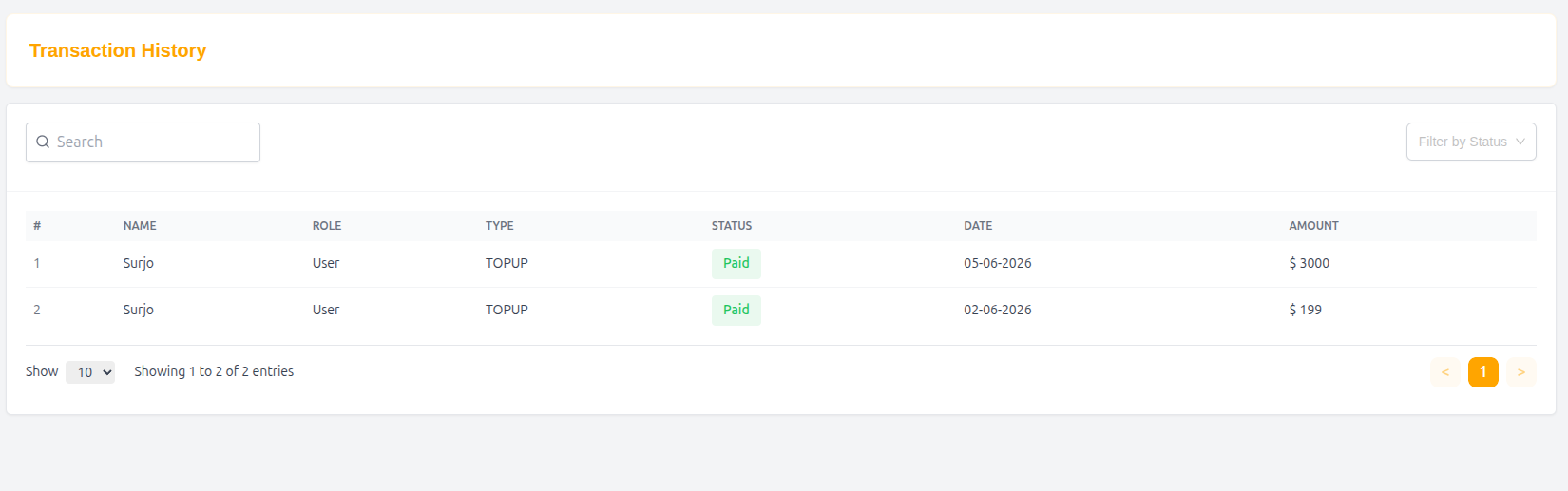
The Transaction History page allows users and administrators to view, search, and monitor all wallet top-up transactions. It provides transaction details including user information, payment status, date, and amount.
Features
1. Search Transactions
A search box is available at the top-left corner of the page.
Purpose:
- Search transactions by user name or relevant transaction information.
- Quickly locate specific records.
2. Status Filter
A dropdown filter is available at the top-right corner.
Options:
- All
- Paid
- Pending
- Failed (if applicable)
Purpose:
- Filter transactions based on payment status.
3. Transaction Table
The transaction list is displayed in a structured table.
| Column | Description |
|---|---|
| # | Serial number of the transaction |
| Name | User's name |
| Role | User role (e.g., User, Driver, Admin) |
| Type | Transaction type (e.g., TOPUP) |
| Status | Payment status |
| Date | Transaction date |
| Amount | Transaction amount |
Status Types
Paid
Indicates the transaction was completed successfully.
Pending
Indicates the payment is awaiting confirmation.
Failed
Indicates the transaction was unsuccessful.
Pagination
Pagination controls are available at the bottom-right corner.
Features
- Navigate between pages.
- Display current page number.
- Previous (
<) and Next (>) buttons.
Entries Per Page
Located at the bottom-left of the table.
Purpose:
- Select how many transactions to display per page.
- Example values:
- 10
- 25
- 50
- 100
Example Transaction
| # | Name | Role | Type | Status | Date | Amount |
|---|---|---|---|---|---|---|
| 1 | Surjo | User | TOPUP | Paid | 05-06-2026 | $3000 |
User Flow
- Open the Transaction History page.
- Search for a transaction using the search box.
- Filter transactions by status if needed.
- Review transaction details in the table.
- Use pagination to browse additional records.
- Adjust entries per page for easier viewing.
Purpose
The Transaction History module provides transparency and tracking for wallet top-ups and payment activities, helping users and administrators monitor financial transactions efficiently.