Roles & Permissions Management
The Roles & Permissions module allows administrators to create and manage role-based access control (RBAC) for the Drivo platform.
This system helps control which users or staff members can access, view, create, edit, or delete specific modules within the admin panel.
Roles List
The Roles List page displays all available system roles in a structured table format.
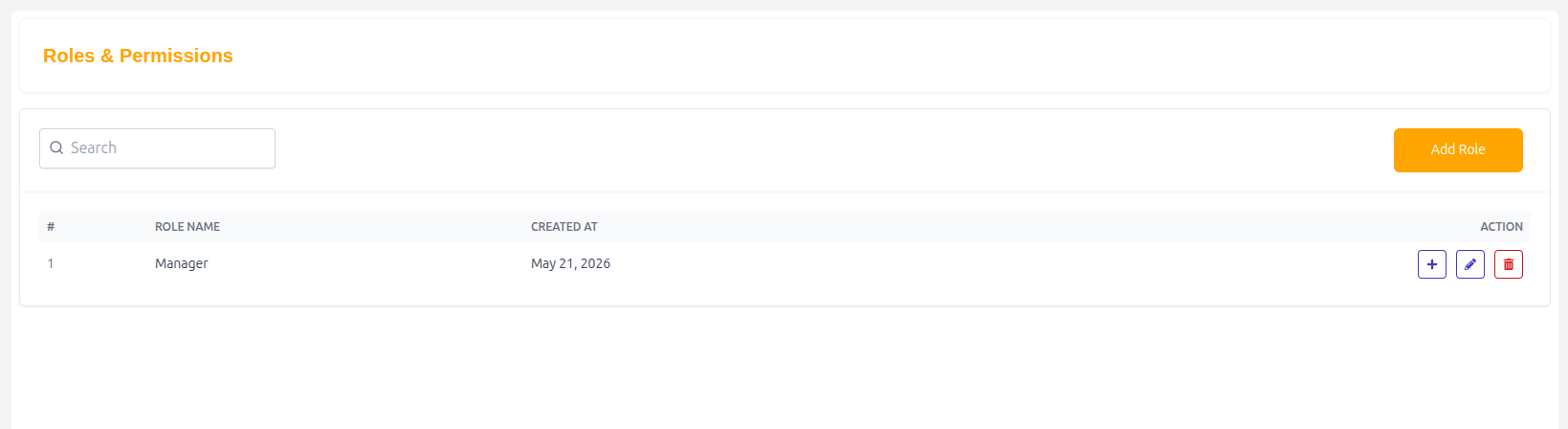
Features
- Search roles quickly
- Add new roles
- Manage role permissions
- Control admin panel access
- Organize staff responsibilities securely
Table Structure
| Column | Description |
|---|---|
| # | Serial number |
| Role Name | Name of the role |
| Created At | Role creation date |
| Action | Edit or manage permissions |
Example Entry
| # | Role Name | Created At | Action |
|---|---|---|---|
| 1 | Manager | May 21, 2026 | Manage Permissions |
Add Role
Administrators can create new system roles.
Example Roles
- Super Admin
- Manager
- Support Agent
- HR Manager
- Finance Manager
Permission Management
Administrators can assign permissions to each role by clicking the + icon beside the role.
Permissions → Manager
This section displays all available modules and permission actions for the selected role.
Permission Actions
Each module contains the following permission controls:
| Permission | Description |
|---|---|
| Create | Allows creating new records |
| Edit | Allows updating records |
| Delete | Allows removing records |
| View | Allows viewing module data |
Available Modules
The following modules support permission management:
| Module |
|---|
| Setting |
| Bag Share |
| Contact |
| FAQ |
| Notification |
| Order |
| Parcel Delivery |
| Parcel Delivery Type |
| Partner |
| Dashboard |
| Coupon |
| HRM |
| Page |
| Review |
| Ride Request |
| Language |
| Withdraw |
| Subscriber |
| Vehicle |
| Vehicle Brand |
| Vehicle Model |
| Vehicle Type |
| Wallet |
| Users |
| Driver |
Example Permission Structure
| Module | Create | Edit | Delete | View |
|---|---|---|---|---|
| Vehicle | ✓ | ✓ | ✗ | ✓ |
| Users | ✗ | ✓ | ✗ | ✓ |
| Coupon | ✓ | ✓ | ✓ | ✓ |
Save Permissions
After configuring all permissions:
- Click Save to apply permission updates for the selected role.
Why Roles & Permissions Matter
- Enhances platform security
- Prevents unauthorized access
- Organizes staff responsibilities
- Protects sensitive data
- Supports scalable admin management
Summary
The Roles & Permissions Management system provides secure and flexible access control for the Drivo platform, allowing administrators to define role-specific permissions and maintain organized, secure, and efficient system operations.