Driver
The Driver Management module allows administrators to view, manage, and control all registered drivers on the Drivo platform. It includes driver listing, filtering, and full profile editing capabilities.
Driver List
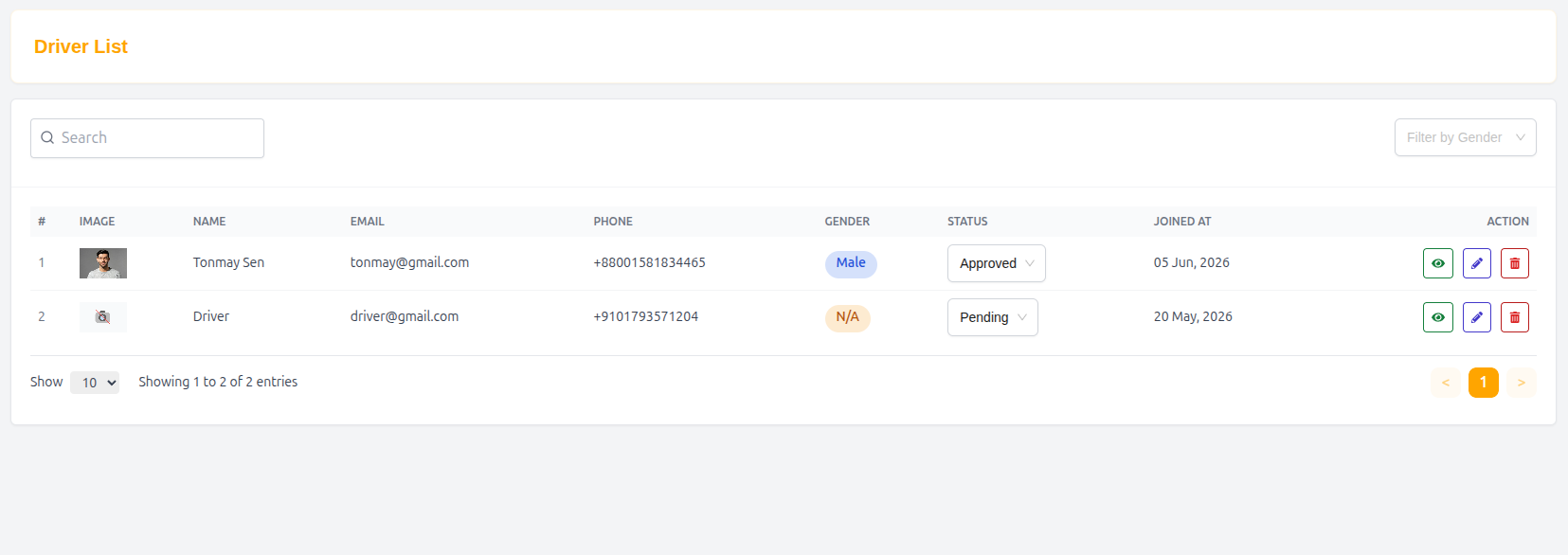
The Driver List page displays all registered drivers in a structured table format for easy management.
Features
- Search drivers by name, email, or phone
- Filter drivers by gender
- View driver status (Active, Pending, Suspended, etc.)
- Manage driver accounts through action buttons
Table Structure
| Column | Description |
|---|---|
| # | Serial number |
| Image | Driver profile image |
| Name | Full name of driver |
| Registered email address | |
| Phone | Contact number |
| Gender | Driver gender (if available) |
| Status | Current account status |
| Joined At | Registration date |
| Action | Admin controls (View, Edit, Block, Delete) |
Example Entry
| # | Image | Name | Phone | Gender | Status | Joined At | Action | |
|---|---|---|---|---|---|---|---|---|
| 1 | 👤 | Driver | driver@gmail.com | +9101793571204 | N/A | Active | 20 May, 2026 | Edit / View |
Driver Details & Edit Driver
The Edit Driver page allows administrators to update driver personal details, documents, and vehicle information.
Driver Information
Basic profile and identity details of the driver.
Fields
- Name
- Phone
- Gender (Select Gender)
- Date of Birth
- Driver Image (Upload)
Driver Documents
Verification documents required for driver approval.
License Information
- License Front (Upload)
- License Back (Upload)
National ID
- National ID Front (Upload)
- National ID Back (Upload)
Vehicle Information
Details of the driver’s vehicle used for ride-sharing and delivery services.
Fields
- Vehicle Type (Select Type)
- Brand (Select Brand)
- Model (Select Model)
- Year
- Seats (Number of seats)
- Weight Limit (kg)
Vehicle Images
- Vehicle Image Upload
- Additional License or Vehicle Documents Upload
Driver Status
Set the current status of the driver account:
- Active
- Pending
- Suspended
- Rejected
Update Driver
After editing all required fields, administrators can click:
- Update Driver to save changes and apply updates to the system.
Summary
The Driver Management system provides full control over driver onboarding, verification, and management. It ensures that all drivers are properly documented, verified, and maintained within a secure and structured platform for Drivo operations.