User
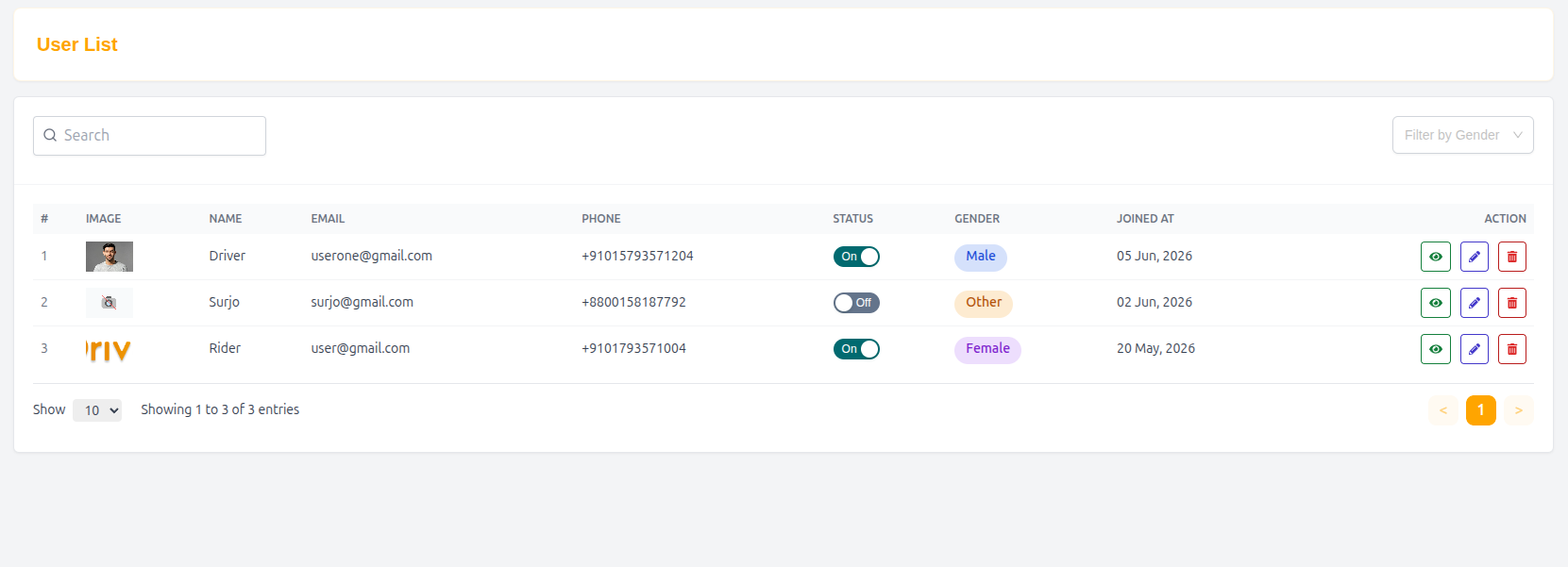
The User List page displays all registered users of the Drivo platform. It helps administrators manage users, monitor activity, and maintain platform security and data consistency.
User Management Features
This section provides tools for searching, filtering, and managing users efficiently.
Search Users
Administrators can search users by:
- Name
- Phone number
This helps quickly locate specific user accounts.
Filter by Gender
Users can be filtered based on gender selection:
- Male
- Female
- Other (if enabled in system)
This allows better segmentation and analysis of user data.
User Table Overview
The user list is displayed in a structured table format for easy management.
Table Columns
| Column | Description |
|---|---|
| # | Serial number of the user |
| Image | User profile picture |
| Name | Full name of the user |
| Registered email address | |
| Phone | Contact number |
| Gender | User gender information |
| Joined At | Registration date |
| Action | Admin controls (View, Edit, Block, Delete) |
Example Entry
| # | Image | Name | Phone | Gender | Joined At | Action | |
|---|---|---|---|---|---|---|---|
| 1 | 👤 | Rider | user@gmail.com | +9101793571004 | Female | 20 May, 2026 | View / Edit |
Pagination
The user list supports pagination to manage large datasets efficiently.
- Show entries per page (e.g., 10, 25, 50)
- Navigation between pages
- Displays: “Showing 1 to X of Y entries”
User Actions
Administrators can perform the following actions:
- View user details
- Edit user information
- Block or unblock users
- Delete user accounts (if required)
Summary
The User List page ensures full control over platform users, allowing administrators to manage accounts, monitor activity, and maintain a secure and organized system for Drivo operations.